-
-
UDEMY
UDEMY
-
-
Building a mobile e-commerce website
UX / UI
UX / UI
Figma
Figjam
Notion
2024
2024
Figma
Figjam
Notion
Situation
Situation
S
.

Context
I recently completed a course to fully solidify my transition from XD towards Figma. In this course, a random project generator was used to obtain a base and a common thread throughout.
I decided to push the project further to obtain a high fidelity and comprehensive retail mobile website. I wanted to have this work done and integrated here quickly.
In order to simplify things I also decided that :
The brand would sell only one product
I will not try to rework the name of the company nor the logo made in the course
Context
I recently completed a course to fully solidify my transition from XD towards Figma. In this course, a random project generator was used to obtain a base and a common thread throughout.
I decided to push the project further to obtain a high fidelity and comprehensive retail mobile website. I wanted to have this work done and integrated here quickly.
In order to simplify things I also decided that :
The brand would sell only one product
I will not try to rework the name of the company nor the logo made in the course
Task (s)
Task (s)
T
.
Produce a simple e-commerce mobile website. The ulimate objective was to push further and practice what on learned on the Udemy Figma course.
Actions
Actions
A
.
Userflow
Feature list and priorization
Desk / Secondary Research
Competitive Benchmark
Wireframing
Results
Results
R
.
Signing Up
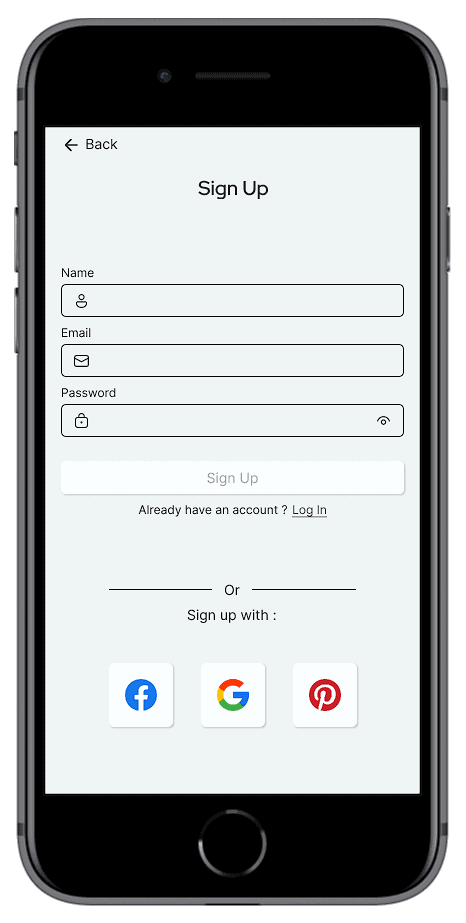
First aspect that could be tailored to the persona specifics given in the project brief were the choices of social media for the direct sign up / log in.
Here the choices are consistent with the demographic informations provided : facebook for the age group and pinterest for the gender.
Signing Up
First aspect that could be tailored to the persona specifics given in the project brief were the choices of social media for the direct sign up / log in.
Here the choices are consistent with the demographic informations provided : facebook for the age group and pinterest for the gender.
Signing Up - Mail Error
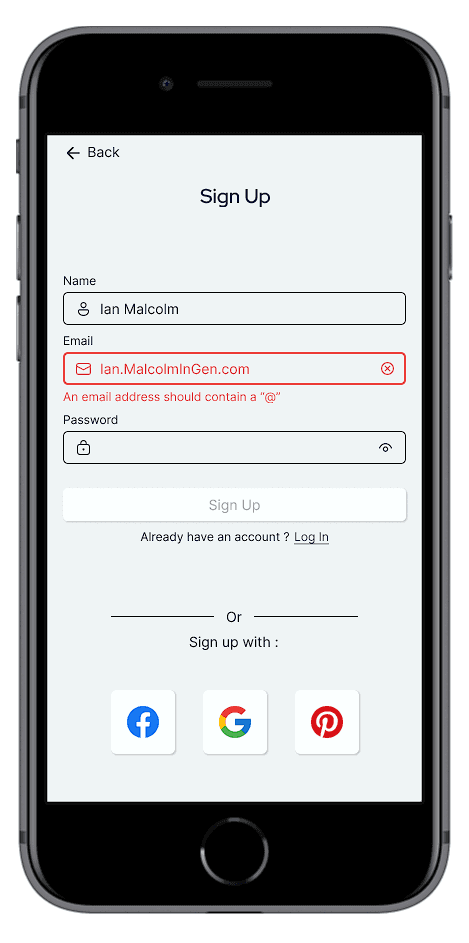
Account creation has a couple important milestones as far as user experience is concerned.
For the email field clear feedback, both visual and textual, has to be provided for the user to be able to effectively correct any mistake that can occur.
Signing Up - Mail Error
Account creation has a couple important milestones as far as user experience is concerned.
For the email field clear feedback, both visual and textual, has to be provided for the user to be able to effectively correct any mistake that can occur.
Signing Up - Password Strength
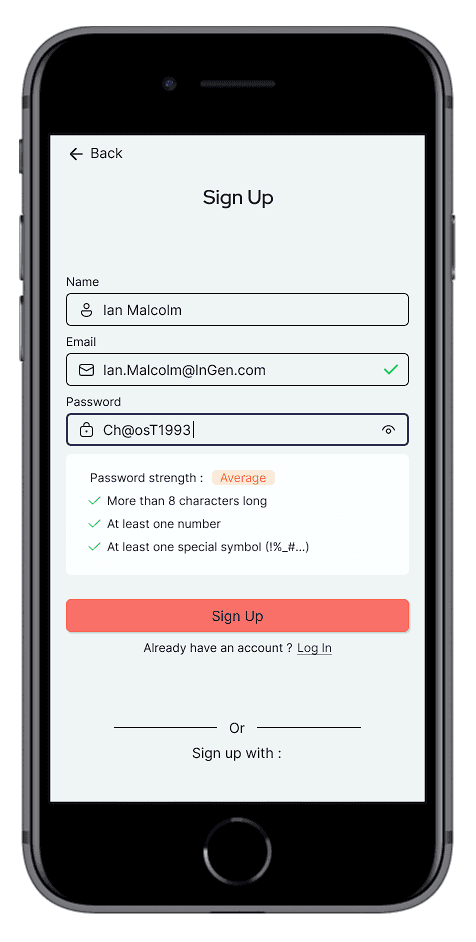
For the password, clear guidelines exists. For example, the app shouldn't have the user play a tedious trial and error game to figure out what are the password’s validity rules. Therefore as soon as the user edits the password field those rules should be provided.
It is also standard practice to provide a password strength indicator. This is done to encourage the user to create a stronger password.
Finally showing the password by default is a solution that promotes usability as a net gain for the user as the sacrifice of security is superficial :
[…] there’s a visible touch keyboard directly below the input field that highlights each key as you press it. These bits of feedback show the characters in a password at a larger size than most input fields. So in reality, the •••• characters aren’t really hiding a password from prying eyes anyway.
Luke Wroblewski, Google
Signing Up - Mail Error
Account creation has a couple important milestones as far as user experience is concerned.
For the email field clear feedback, both visual and textual, has to be provided for the user to be able to effectively correct any mistake that can occur.
Product Page - Social Media
The design of the product page was another opportunity to try to use the information given in the project brief about the target user of the brand (see illustration).
The purchase decisions of this user seems to be influenced by social media content therefore including a space that includes this type of content should be beneficial to the brand.
Signing Up - Mail Error
Account creation has a couple important milestones as far as user experience is concerned.
For the email field clear feedback, both visual and textual, has to be provided for the user to be able to effectively correct any mistake that can occur.
Product Page - Reviews
Good reviews are key in e-commerce. This is supported by evidence from the business world and from academic research in Psychology (see Chen et al., 2022 for example). Consequently, proposing a good user experience on this page is fundamental. Here, it comes down to the readability of the review cards and on how the options to handle the content are presented.
Thankfully, reviews typically don’t contain too much parameters on which to filter and sort so making them readily available to the user is possible without taking too much space. More importantly, the selection and the feedback on this selection can be done and shown on this single screen without having to leave it which is the best solution when feasible.
To foolproof my work I used this great ressource on designing filters.
Signing Up - Mail Error
Account creation has a couple important milestones as far as user experience is concerned.
For the email field clear feedback, both visual and textual, has to be provided for the user to be able to effectively correct any mistake that can occur.
Product Configuration + Cart + Checkout
It was important for me to have a product configuration page as it was a feature that was quite common in the bike market. The main visual challenge of this page was to be able to have a color picker that doesn’t disrupt the visual identity of the page while still being usable. Each color is a line which takes up a lot of space however, that allows :
a color preview of a significant size to be shown and easily perceivable
a generous touch target
a unified appearance with the rest of the parameters
For the checkout page it is important to provide a quick summary of what was selected in the previous step so the user doesn’t have to come back if one element is forgotten (even if it seems that the number of parameters seem manageable. Reminder : the 7+/-2 rule is a myth).
Signing Up - Mail Error
Account creation has a couple important milestones as far as user experience is concerned.
For the email field clear feedback, both visual and textual, has to be provided for the user to be able to effectively correct any mistake that can occur.
Account Page : Order Tracking
The order tracking page is important to try to answer as quickly as possible many questions any user might have : where exactly is my order ? Which card was used to buy it ? When was my order shipped ?
I chose a vertical timeline and two levels of information placed on it, matching two levels of details.
Signing Up - Mail Error
Account creation has a couple important milestones as far as user experience is concerned.
For the email field clear feedback, both visual and textual, has to be provided for the user to be able to effectively correct any mistake that can occur.
Order Tracking : Delay
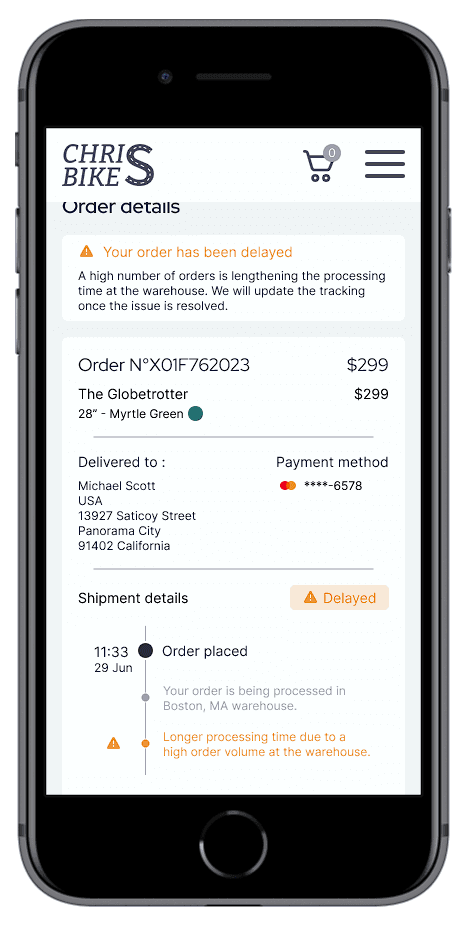
Order informations and tracking is an area where the user experience isn’t always great. It was particularly important for me to design a flow that gives the right information at the right times and at the right places.
I took a lot of inspiration from this case study especially for the tracking part where I showcased how the user is informed about any problem about their order which has great impact on user satisfaction and therefore on key KPIs for business.
Signing Up - Mail Error
Account creation has a couple important milestones as far as user experience is concerned.
For the email field clear feedback, both visual and textual, has to be provided for the user to be able to effectively correct any mistake that can occur.
© 2026 Matthieu Vanbecelaere — Designed & built in